

The rapid migration to cloud infrastructure has transformed how businesses operate—but it’s also opened new security challenges. With average data breach costs reaching $4.88 million in 2024, and cloud-specific breaches averaging $5.17 million, organizations of all sizes must prioritize robust cloud security implementations.
This comprehensive guide walks you through cloud security fundamentals, common vulnerabilities, industry compliance requirements, and step-by-step implementation strategies tailored to both enterprise and small business environments. Whether you’re just beginning your cloud journey or optimizing existing deployments, understanding these core principles will help protect your organization’s most critical assets.
What Is Cloud Security and Why It Matters
Cloud security is the discipline of protecting cloud-based infrastructure, applications, and data from both internal and external threats. Unlike traditional on-premises security, cloud security operates within a shared responsibility model—where your cloud provider secures the underlying infrastructure while your organization protects data, applications, and user access.
This distinction is critical: simply moving to the cloud doesn’t automatically secure your assets. Organizations remain responsible for implementing proper configurations, managing identities, encrypting data, and monitoring activities within their cloud environments.
The Business Impact
The stakes are high. Beyond the direct costs of breach remediation, organizations face:
- Operational disruption and downtime (average 276 days to identify and contain multi-cloud breaches)
- Regulatory fines ranging from $100 to $50,000 per HIPAA violation, up to $1.5 million annually
- Reputational damage and loss of customer trust
- Compliance violations affecting business licensing and partnerships
Conversely, organizations implementing proper cloud security frameworks report:
- 240% ROI in three years through risk reduction and operational efficiency
- 50% faster incident response times (Mean Time to Respond)
- 4.01x greater returns compared to on-premises security solutions
- 70% reduction in breach risk through enhanced monitoring and detection
Understanding the Shared Responsibility Model
The shared responsibility model is the foundation of cloud security. Understanding where your obligations begin and your provider’s responsibilities end is essential to avoiding dangerous gaps.
What Your Cloud Provider Handles
- Physical infrastructure protection across data centers
- Underlying host infrastructure security
- Default data encryption between services
- Network segmentation and DDoS protection
- Patching cloud infrastructure components
Your Organization’s Responsibilities
- Identity and Access Management (IAM): Managing user accounts, permissions, roles, and multi-factor authentication
- Data Classification and Encryption: Determining what data needs protection and ensuring encryption at rest and in transit
- Application Security: Securing custom applications deployed in the cloud
- Configuration Management: Ensuring cloud resources are configured securely without dangerous misconfigurations
- Monitoring and Logging: Implementing continuous oversight of cloud activities
- Compliance Controls: Meeting regulatory requirements specific to your industry
- Incident Response: Detecting, investigating, and responding to security incidents
TOP CLOUD SECURITY VULNERABILITIES EVERY ORGANIZATION MUST ADDRESS
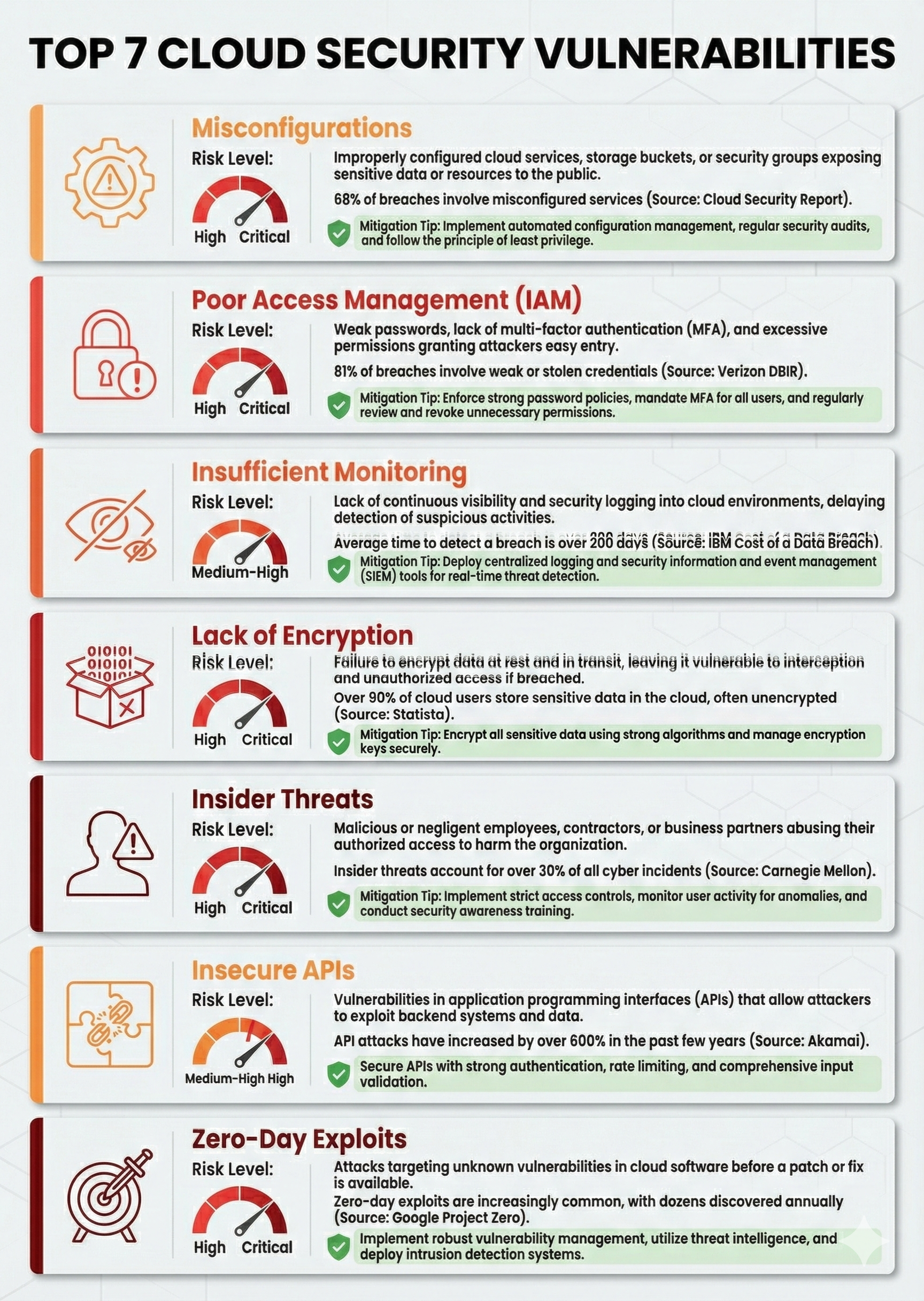
1. Misconfigurations
The Problem: Misconfigurations remain the leading cause of cloud breaches, often stemming from human error, insufficient training, or the sheer complexity of cloud platforms.
Common Examples:
- Storage buckets (like AWS S3) left publicly accessible
- Overly permissive access control lists (ACLs)
- Open security group rules exposing critical systems to the internet
- Default credentials left unchanged
- Unencrypted databases and storage systems
Real-World Impact: Capital One’s 2019 breach affected 100+ million customers due to a misconfigured AWS firewall, costing the company over $190 million—a cost that could have been prevented with basic automated configuration auditing.
How to Address It:
- Deploy Cloud Security Posture Management (CSPM) tools that continuously scan for misconfigurations
- Automate security baselines using infrastructure-as-code (IaC) principles
- Implement policy-as-code to enforce consistent configurations across environments
- Conduct regular configuration audits and remediation cycles
- Use tools like AWS Config, Azure Policy, and GCP Security Command Center for ongoing oversight
2. Poor Identity and Access Management (IAM)
The Problem: Digital identities vastly outnumber human identities in cloud environments, making them high-value targets for attackers. Weak credentials, overprivileged accounts, and lack of multi-factor authentication (MFA) create dangerous entry points.
Common IAM Failures:
- Missing or weak multi-factor authentication
- Excessive permissions (overprivilege)
- Shared or default credentials
- Lack of identity governance and lifecycle management
- Compromised service account keys
- Inadequate monitoring of privileged account activities
How to Address It:
- Enable MFA immediately across all human and privileged accounts
- Implement zero-trust architecture: Never trust, always verify. Verify every user and device, regardless of location
- Apply least privilege principles: Users and services access only the resources essential for their roles
- Conduct IAM audits weekly: Use tools like IAM Policy Analyzer to identify and remove over-provisioned permissions
- Centralize identity management: Implement Single Sign-On (SSO) with centralized directory services
- Use Workload Identity Federation for machine identities, eliminating risky long-lived service account keys
- Establish identity governance processes to track access, manage role changes, and audit access decisions
3. Insufficient Monitoring and Detection
The Problem: Cloud environments generate massive volumes of logs and telemetry data. Without proper centralized monitoring, attackers can exploit resources and exfiltrate data for weeks without detection.
Common Gaps:
- Lack of centralized logging across cloud resources
- Missing security alerts for suspicious activities
- No baseline established for normal behavior
- Inadequate analysis of audit logs
- Slow detection and response times (average dwell time: 276 days in multi-cloud environments)
How to Address It:
- Implement centralized logging: Collect and aggregate logs from all cloud resources in a central location
- Deploy Security Information and Event Management (SIEM) or Security Operations Platform solutions
- Set intelligent alerts for anomalous activities: unusual login patterns, API spikes, data downloads, failed access attempts
- Establish baseline behavior: Know what normal looks like to detect deviations
- Conduct continuous threat hunting across regions and accounts
- Monitor privileged account activities specifically—these pose the highest risk
- Integrate threat intelligence to correlate internal logs with known attack patterns
4. Inadequate Data Protection and Encryption
The Problem: Unencrypted data is accessible to anyone who gains unauthorized access. Even if attackers breach your cloud environment, encryption prevents them from reading sensitive information.
Protection Gaps:
- Data at rest (stored) without encryption
- Data in transit (moving between systems) transmitted unencrypted
- Encryption keys stored insecurely
- No encryption at the application layer
- Lack of key rotation policies
How to Address It:
- Encrypt all sensitive data at rest using provider-managed or customer-managed encryption keys
- Enforce TLS/SSL for all data in transit
- Implement application-layer encryption for highly sensitive workloads, maintaining control over encryption keys
- Use customer-managed keys (CMK) via AWS KMS, Azure Key Vault, or GCP Cloud KMS for sensitive data requiring strict access controls
- Establish key rotation policies to ensure keys are regularly refreshed
- Maintain encryption key security using hardware security modules (HSMs) for critical keys
- Apply encryption to backups to maintain protection throughout the data lifecycle
5. Insider Threats (Accidental and Malicious)
The Problem: Legitimate access makes insiders particularly dangerous. Disgruntled employees, compromised accounts, or negligent staff can cause significant damage.
Risk Scenarios:
- Former employees with lingering access deleting critical resources
- Careless handling of credentials or sensitive information
- Intentional data theft or sabotage
- Shadow IT and unauthorized cloud accounts
How to Address It:
- Implement robust offboarding processes that immediately revoke access when employees leave
- Monitor privileged accounts continuously for unusual activities
- Establish data loss prevention (DLP) controls to prevent unauthorized exfiltration
- Conduct regular access reviews to identify and remove obsolete permissions
- Foster a security-conscious culture through training and awareness programs
- Segregate duties to prevent single individuals from having excessive control
- Track all user and administrative actions through detailed audit logging
6. Insecure APIs and Third-Party Integrations
The Problem: Cloud services communicate through APIs. Insecure or improperly configured APIs expose data and systems to unauthorized access.
How to Address It:
- Implement API authentication and authorization controls
- Use OAuth 2.0 and other modern authentication standards
- Conduct security assessments of third-party integrations
- Monitor API activity for suspicious patterns
- Implement API rate limiting and DDoS protection
- Use Web Application Firewalls (WAF) to protect APIs
- Regularly update API security protocols
7. Advanced Persistent Threats and Zero-Day Exploits
The Problem: Sophisticated attackers use zero-day vulnerabilities (flaws unknown to vendors) to access cloud systems before patches become available.
How to Address It:
- Deploy intrusion detection and prevention systems (IDPS)
- Use behavioral anomaly detection to identify unknown attack patterns
- Implement virtual patching to mitigate risks until official patches are available
- Maintain robust backup and disaster recovery capabilities
- Conduct regular penetration testing to identify weaknesses
- Subscribe to threat intelligence feeds to stay ahead of emerging threats
- Implement network segmentation to prevent lateral movement
COMPLIANCE FRAMEWORKS: MEETING REGULATORY REQUIREMENTS
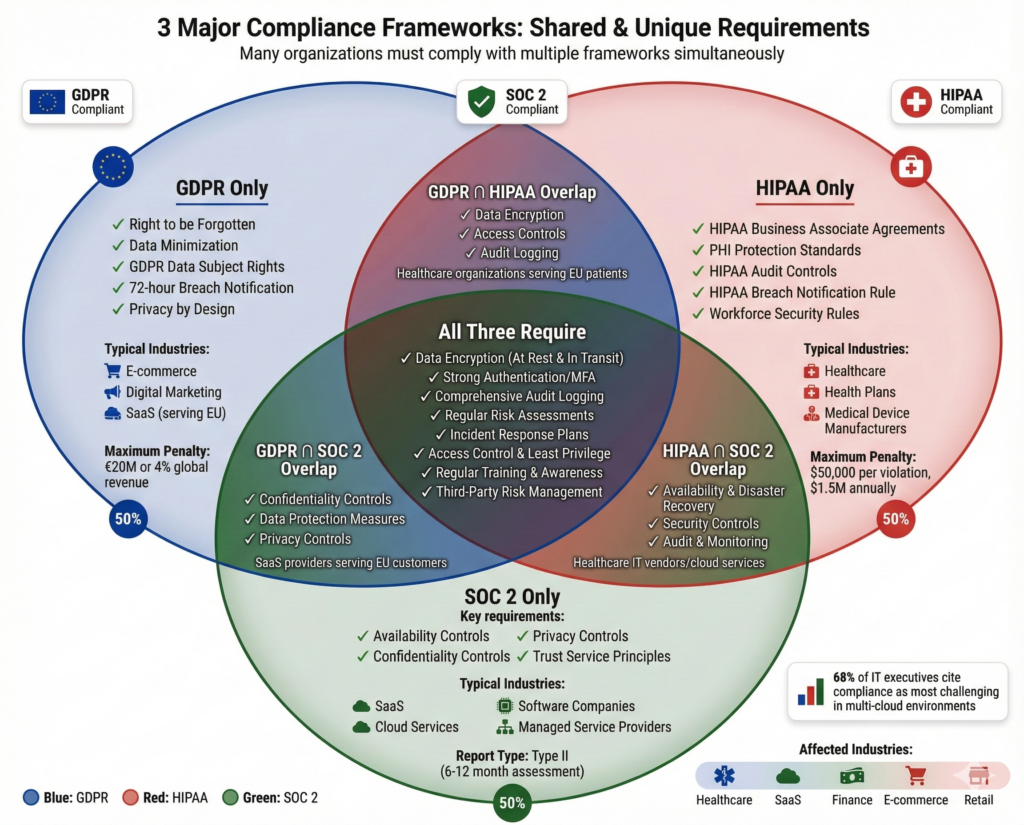
Organizations today face multiple compliance obligations. Three frameworks—GDPR, HIPAA, and SOC 2—are particularly critical for cloud security.
GDPR (General Data Protection Regulation)
Scope: Applies to any organization handling personal data of EU citizens, regardless of where the organization is located.
Key Requirements:
| Requirement | What It Means |
|---|---|
| Data Encryption | All personal data must be encrypted both in transit and at rest |
| Data Minimization | Collect and retain only data absolutely necessary for stated purposes |
| Consent Management | Users must explicitly consent to data processing; consent must be documented and verifiable |
| Right to Erasure | Users can request deletion of their personal data (“right to be forgotten”) |
| Breach Notification | Organizations must notify affected parties within 72 hours of discovering a breach |
| Data Processing Agreements | Cloud providers must sign Data Processing Agreements (DPAs) acknowledging their compliance obligations |
GDPR Violations: Fines up to €20 million or 4% of global annual revenue (whichever is higher)
Implementation Steps:
- Conduct data discovery to identify where personal data resides
- Implement data classification to distinguish personal from non-personal data
- Enable encryption for all personal data
- Establish consent management systems
- Implement data retention and deletion policies
- Document all processing activities
- Establish incident response procedures for breach notification
HIPAA (Health Insurance Portability and Accountability Act)
Scope: Applies to healthcare organizations, health plans, and their business associates storing or processing Protected Health Information (PHI).
Key Requirements:
| Requirement | What It Means |
|---|---|
| Access Controls | Only authorized users can access PHI; implement role-based access control |
| Audit Controls | All PHI handling must be logged and monitored; maintain audit trails |
| Encryption | PHI must be encrypted at rest and in transit |
| Data Integrity | Implement controls to detect and prevent unauthorized alteration of PHI |
| Transmission Security | Protect PHI during network transmission; use TLS/SSL encryption |
| Business Associate Agreements (BAAs) | Cloud providers must sign BAAs confirming their compliance with HIPAA obligations |
| Risk Assessment | Organizations must conduct regular assessments of PHI security risks |
HIPAA Violations: $100–$50,000 per violation; up to $1.5 million annually per violation category
Unique Considerations for Cloud:
- Cloud providers handling PHI must be HIPAA-eligible
- Organizations remain liable for provider security practices
- Use cloud provider BAA requirements when selecting vendors
- Implement encryption with keys under your organization’s control
- Ensure audit logging meets HIPAA requirements (typically 6-year retention)
Implementation Priorities:
- Select HIPAA-eligible cloud providers and ensure BAAs are in place
- Implement comprehensive encryption at rest and in transit
- Establish and test access controls and audit logging
- Conduct a security risk assessment
- Develop comprehensive backup and disaster recovery procedures
- Establish incident response and breach notification procedures
- Implement workforce security training
SOC 2 (Service Organization Control 2)
Scope: Applies to service providers and SaaS companies that process customer data. Demonstrates that adequate security controls are in place.
Five Trust Service Principles:
| Principle | Focus Area |
|---|---|
| Security | Systems are protected against unauthorized access |
| Availability | Systems function as designed and are available per SLA |
| Processing Integrity | Data processing is accurate, complete, timely, and authorized |
| Confidentiality | Confidential data is protected from unauthorized access |
| Privacy | Personal information is collected, used, and retained according to user expectations and regulatory requirements |
Report Types:
- Type I Report: Assesses controls at a point in time (less common)
- Type II Report: Assesses controls over 6-12 months, demonstrating effectiveness over time (more credible)
Key Controls to Implement:
- Access Management: Implement least privilege, MFA, and regular access reviews
- Encryption: Encrypt data at rest and in transit
- Incident Response: Develop and test procedures for detecting and responding to incidents
- Change Management: Implement controls to manage system changes securely
- Network Security: Implement firewalls, network segmentation, and intrusion detection
- Monitoring and Logging: Implement comprehensive logging and monitoring of security-relevant activities
- Risk Management: Conduct regular risk assessments and vulnerability scans
- Supplier/Third-Party Management: Evaluate and monitor third-party security controls
Business Benefits:
- Demonstrates commitment to data security to customers and partners
- Reduces customer audit burden (customers can rely on your SOC 2 report rather than conducting their own audits)
- Creates competitive advantage in markets where compliance is expected
- Facilitates enterprise sales by meeting vendor security requirements
CLOUD SECURITY MATURITY MODEL: ASSESS YOUR CURRENT STATE
The Cloud Security Maturity Model (CSMM) provides a framework to assess where your organization stands and identify the next steps in your security evolution.
Five Maturity Levels
Level 1: Initial/Partial
- Security practices are ad hoc and informal
- Limited documented policies and procedures
- Reactive rather than proactive security posture
- Significant security gaps and risk exposure
Level 2: Intermediate/Developing
- Basic cloud security policies and procedures are established
- Organization acknowledges cloud security risks
- Some controls are implemented, but consistency and formality are lacking
- Beginning to track security metrics
Level 3: Advanced/Defined
- Comprehensive cloud security policies and roadmap implemented
- Active monitoring and management across cloud environments
- Security controls are largely automated
- Regular audits against industry standards
- Defined incident response procedures
- Security integrated into development and deployment processes
Level 4: Leading/Managed
- Resilient and scalable cloud security strategy
- Advanced controls and practices exceeding industry standards
- High degree of automation across all security domains
- Continuous security research and adoption of emerging technologies
- Business-level reporting on security metrics and risk
- Proactive threat detection and response
Level 5: Optimized/Dynamic
- Continuous improvement through machine learning and automation
- Predictive and preventative security posture
- Full integration of security across all cloud operations
- Zero-trust principles embedded in all aspects of operations
- Real-time adaptation to emerging threats
- Optimization of security investments for maximum ROI
Assessing Your Current State
Conduct a CSMM assessment by evaluating your organization across key domains:
- Governance & Risk Management: Policies, risk assessments, compliance monitoring
- Identity & Access Management: User provisioning, authentication, authorization, privilege management
- Data Protection: Classification, encryption, loss prevention
- Monitoring & Detection: Logging, monitoring, threat detection, alerting
- Incident Response: Detection, investigation, containment, recovery
- Vendor Management: Third-party security assessments, contracts, ongoing monitoring
- Security Operations: Staffing, processes, automation, tools
- Cloud Architecture: Network security, workload protection, segmentation
Most organizations start at Level 1 or 2. The goal is to progress toward Level 3-4, which balances strong security with operational efficiency.
ZERO TRUST ARCHITECTURE: THE MODERN APPROACH
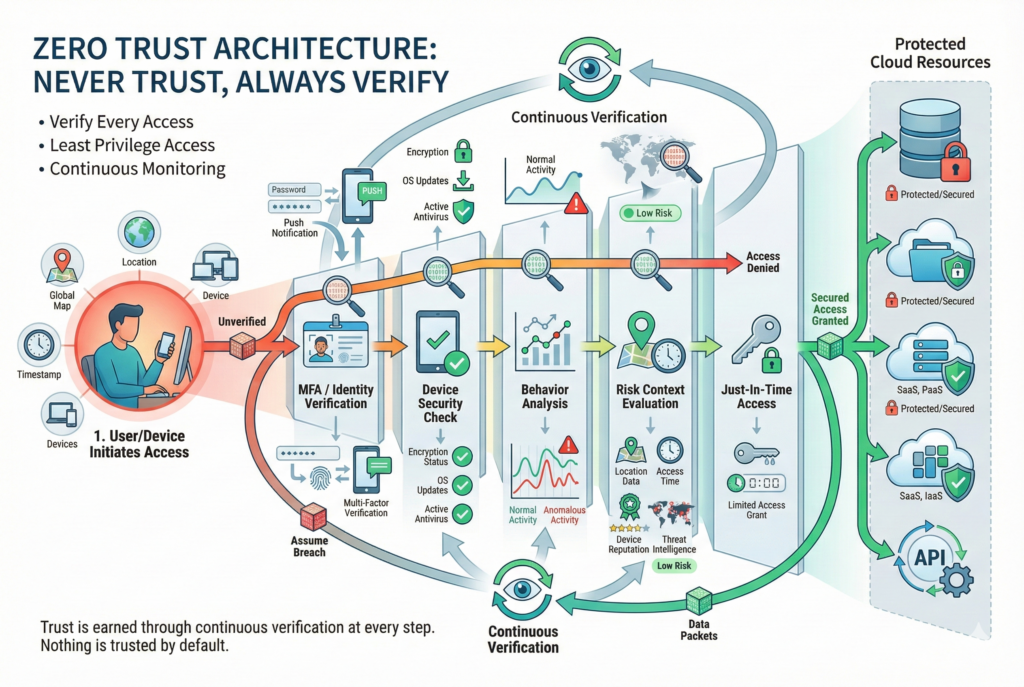
Zero Trust represents a fundamental shift in cloud security thinking: instead of building a strong perimeter and trusting everything inside, zero trust assumes threats exist everywhere and requires continuous verification of every user, device, and request.
Core Zero Trust Principles
- Never Trust, Always Verify: Every access request must be authenticated and authorized, regardless of origin
- Least Privilege Access: Users and services receive minimum necessary permissions for their roles
- Assume Breach Mentality: Design systems assuming compromise is inevitable; implement controls to detect and limit damage
- Micro-Segmentation: Divide networks into smaller segments with granular access controls
- Continuous Monitoring: Monitor and analyze all activities for signs of compromise
- Verify Device Posture: Ensure devices meet security standards before granting access
- Encrypt Everything: Encrypt data at rest and in transit; control encryption keys
Zero Trust Implementation Components
| Component | Purpose | Example Technologies |
|---|---|---|
| Identity & Authentication | Verify user identity and device security | MFA, Windows Hello, biometrics, device certificates |
| Authorization | Grant appropriate access based on context | Role-based access control (RBAC), attribute-based access control (ABAC) |
| Network Segmentation | Prevent lateral movement; isolate workloads | Firewalls, network policies, service mesh |
| Monitoring & Analytics | Detect suspicious activities and threats | SIEM, user behavior analytics, threat intelligence |
| Data Protection | Protect data throughout its lifecycle | Encryption, data loss prevention (DLP), content classification |
| Endpoint Protection | Secure user devices and systems | EDR (Endpoint Detection & Response), antivirus, vulnerability management |
Zero Trust in Practice
Example Scenario: A zero-trust approach to protecting cloud data differs significantly from perimeter-based security.
Traditional Approach:
- Authenticate user once at network entry
- Grant broad access to network resources
- Assume user/device is trusted for the session
Zero Trust Approach:
- Authenticate user with MFA each session
- Verify device meets security policies (encryption enabled, antivirus active, OS updated)
- Evaluate context: location, time, access pattern, and risk score
- Grant just-in-time (JIT) access to specific resources
- Continuously monitor for suspicious behavior
- Re-verify permissions regularly; revoke if context changes
IMPLEMENTATION GUIDE: STEP-BY-STEP FOR YOUR ORGANIZATION

Phase 1: Assessment and Planning (Weeks 1-4)
Step 1: Conduct a Cloud Security Audit
- Inventory all cloud resources across AWS, Azure, GCP, and other platforms
- Identify data classification and sensitivity levels
- Map existing security controls and identify gaps
- Document current state of IAM, encryption, monitoring, and compliance
- Use tools like AWS Config, Azure Policy, or third-party CSPM solutions
Step 2: Assess Compliance Requirements
- Determine which frameworks apply to your organization (GDPR, HIPAA, SOC 2, etc.)
- Document specific requirements
- Evaluate cloud providers’ compliance certifications
- Identify gaps between current state and required state
Step 3: Develop a Cloud Security Roadmap
- Define security vision aligned with business goals
- Identify quick wins (high-impact, low-effort improvements)
- Establish security maturity target (typically Level 3)
- Create multi-phase implementation plan with timelines and budgets
- Allocate resources and assign ownership
Deliverables:
- Cloud asset inventory
- Data classification matrix
- Security gap analysis
- Compliance requirements document
- Cloud security roadmap with phases and milestones
Phase 2: Foundation Building (Weeks 5-12)
Step 4: Implement Identity and Access Management (IAM)
- Review and cleanup existing IAM policies
- Implement MFA for all human users, especially privileged accounts
- Enable SSO with centralized directory services (Azure AD, Okta, etc.)
- Establish role-based access control (RBAC) and apply least privilege
- Implement privileged access management (PAM) for administrative accounts
- Establish regular access reviews and recertification processes
- Document all IAM policies and processes
Step 5: Enable Comprehensive Logging and Monitoring
- Enable audit logging for all cloud resources and services
- Configure log retention policies aligned with compliance requirements
- Implement centralized logging (e.g., AWS CloudTrail to S3, Azure Monitor, GCP Logging)
- Deploy a SIEM or security operations platform
- Set up alerts for critical security events
- Establish baseline behavior for normal activities
- Create dashboards for security metrics and visibility
Step 6: Establish Data Protection
- Classify all data by sensitivity (public, internal, confidential, restricted)
- Identify sensitive data locations (databases, storage, backups)
- Implement encryption at rest for sensitive data:
- Use provider-managed keys for most workloads
- Use customer-managed keys (CMK) for highly sensitive data
- Enforce encryption in transit (TLS 1.2+)
- Implement data loss prevention (DLP) policies
- Enable versioning and immutable backups for critical data
Step 7: Secure Cloud Configurations
- Establish security baseline configurations for each cloud platform
- Implement Infrastructure as Code (IaC) to enforce consistent configurations
- Deploy cloud security posture management (CSPM) tools:
- AWS: AWS Config, AWS Security Hub
- Azure: Azure Policy, Microsoft Defender for Cloud
- GCP: Security Command Center, Cloud Asset Inventory
- Automate compliance checking and remediation
- Establish configuration review and approval processes
Deliverables:
- IAM policies and role definitions
- MFA implementation across all user and service accounts
- Centralized logging and monitoring infrastructure
- Data classification and encryption standards
- Security baseline configurations
- Automated compliance checking
Phase 3: Advanced Controls (Weeks 13-20)
Step 8: Implement Network Security
- Design network architecture with security in mind (zero trust, micro-segmentation)
- Implement virtual private clouds (VPCs) with proper subnet segregation
- Deploy firewalls and network policies restricting traffic
- Implement Web Application Firewalls (WAF) for customer-facing applications
- Enable DDoS protection (AWS Shield, Azure DDoS Protection, GCP Cloud Armor)
- Use VPNs or private connectivity for sensitive communications (AWS Direct Connect, Azure ExpressRoute)
- Implement network monitoring and threat detection
Step 9: Deploy Workload and Container Security
- Implement container image scanning in your CI/CD pipeline
- Use secure, minimal base images (Alpine, distroless)
- Implement runtime protection for containers and VMs
- Enable workload identity federation to eliminate long-lived service account keys
- Implement container orchestration security (Kubernetes RBAC, network policies)
- Deploy runtime threat detection
- Implement secure supply chain controls
Step 10: Establish Incident Response and Disaster Recovery
- Develop incident response plan and procedures
- Define incident classification and escalation procedures
- Establish incident response team and assign roles
- Create playbooks for common incident types
- Implement automated response for certain incident types
- Establish backup and disaster recovery procedures
- Test incident response and disaster recovery regularly
- Maintain secure, off-site backups
- Document lessons learned from incidents
Step 11: Implement Vulnerability Management
- Deploy vulnerability scanning tools (Qualys, Tenable, AWS Inspector)
- Scan infrastructure, applications, and containers regularly
- Integrate vulnerability scanning into CI/CD pipeline
- Establish vulnerability prioritization based on exploitability and business impact
- Track remediation progress
- Conduct regular penetration testing (at least annually)
- Subscribe to threat intelligence feeds
- Patch systems promptly based on vulnerability severity
Deliverables:
- Network security architecture and policies
- Container and workload security policies
- Incident response plan and playbooks
- Backup and disaster recovery procedures
- Vulnerability management program and scanning
Phase 4: Optimization and Continuous Improvement (Weeks 21+)
Step 12: Security Automation and Orchestration
- Automate routine security tasks (policy enforcement, remediation, reporting)
- Implement security orchestration, automation, and response (SOAR)
- Use infrastructure-as-code for all cloud deployments
- Automate security testing in development pipelines
- Implement continuous compliance monitoring and reporting
- Establish runbooks for common security operations
Step 13: Advanced Threat Detection
- Implement user and entity behavior analytics (UEBA)
- Deploy advanced threat detection and response (EDR)
- Implement network detection and response (NDR)
- Use security information and event management (SIEM) for correlation and analysis
- Enable threat hunting and proactive investigation
- Subscribe to threat intelligence feeds
- Participate in information sharing with industry peers
Step 14: Continuous Assessment and Improvement
- Conduct regular security assessments and audits (at least quarterly)
- Maintain updated security metrics dashboard
- Track security KPIs: Mean Time to Detect (MTTD), Mean Time to Respond (MTTR), incident volume, compliance violations
- Conduct regular training and awareness programs
- Stay current with emerging threats and best practices
- Participate in security communities and conferences
- Continuously update security architecture based on lessons learned
- Implement feedback loops from operations teams
IMPLEMENTATION CONSIDERATIONS FOR ENTERPRISE VS. SMALL BUSINESS
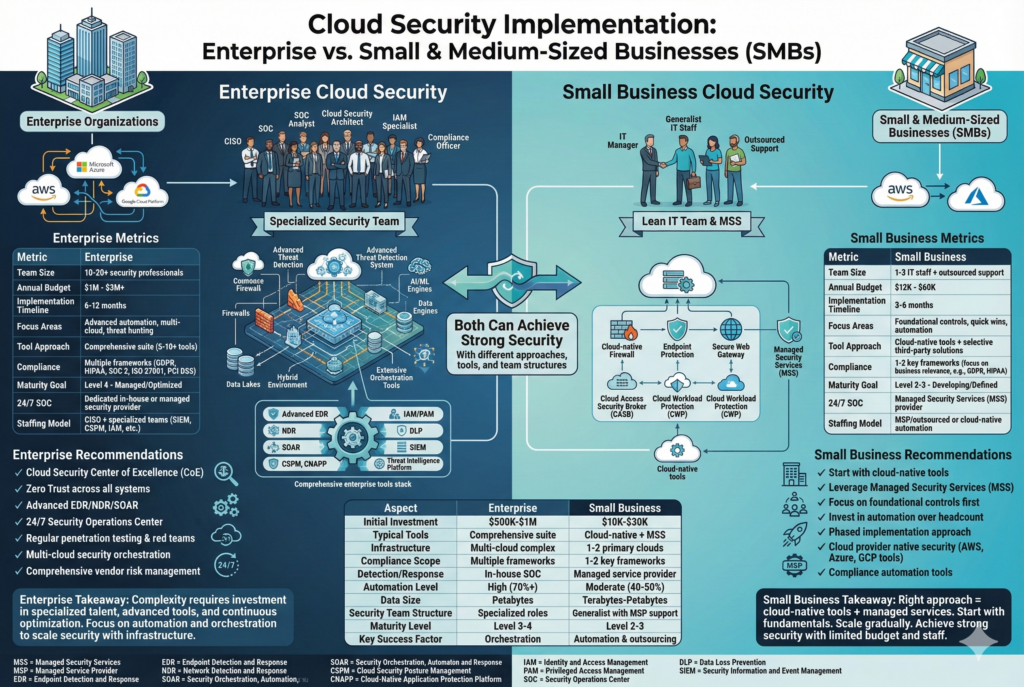
Enterprise Cloud Security Implementation
Advantages:
- Budget for comprehensive security solutions and staffing
- Dedicated security and compliance teams
- Ability to invest in advanced tools and automation
- Scale allows for economies of scale in cloud purchases
Challenges:
- Complexity of large environments with multiple cloud providers
- Legacy systems integration
- Regulatory complexity across multiple jurisdictions
- Cultural change management across large organizations
- Skill gaps in emerging cloud security areas
Enterprise-Specific Recommendations:
- Implement a Chief Information Security Officer (CISO) or Chief Security Officer role
- Establish a Cloud Security Center of Excellence (CoE)
- Implement comprehensive Cloud Access Security Broker (CASB) solutions
- Invest in 24/7 Security Operations Center (SOC) capabilities
- Implement advanced threat detection and response (EDR, NDR)
- Establish security governance and risk committees
- Implement Zero Trust architecture across all systems
- Conduct regular penetration testing and red team exercises
- Implement comprehensive vendor risk management programs
Typical Enterprise Implementation Timeline: 6-12 months to reach Level 3 maturity
Expected Costs:
- Tools and software: $500K–$2M+ annually (depending on scale)
- Personnel: 5-20+ dedicated security professionals
- Consulting and implementation: $250K–$1M+ (if external help)
- Total: $1M–$3M+ annually for comprehensive program
Small Business Cloud Security Implementation
Advantages:
- Simpler cloud environments (typically 1-2 cloud providers)
- Faster decision-making and implementation
- Lower volume of security events to manage
- Opportunity to “build right” from the start
Challenges:
- Limited budgets for security tools and personnel
- Often lack dedicated IT security staff
- Limited technical expertise and training resources
- Still required to meet same compliance standards as large enterprises
Small Business-Specific Recommendations:
- Start with foundational controls (IAM, encryption, monitoring) before advanced tools
- Leverage managed security services (MSS) to reduce staffing needs
- Use cloud provider native security tools (AWS Security Hub, Azure Defender, GCP Security Command Center) before purchasing third-party tools
- Implement policy-as-code to automate compliance without large teams
- Partner with Managed Service Providers (MSPs) for 24/7 monitoring and incident response
- Focus on quick wins with high ROI (MFA, patching, backups)
- Invest in security awareness training for all employees
- Use industry templates and frameworks to accelerate implementation
Typical Small Business Implementation Timeline: 3-6 months to reach Level 2-3 maturity
Expected Costs:
- Cloud provider native tools: $100–$300/month
- Third-party tools (if needed): $200–$500/month per tool
- Managed Security Services: $500–$2,000/month (depending on scale)
- Training and consulting: $5K–$20K (one-time)
- Total: $1K–$5K monthly, or $12K–$60K annually (much more cost-effective than enterprise solutions)
Estimated ROI: Small businesses save approximately $1.76 million by implementing automated cloud security approaches. Considering an average data breach costs $4.45 million, even a small investment in proper security returns significant value.
REAL-WORLD CASE STUDY: ATLASSIAN’S CLOUD SECURITY SUCCESS
Company: Atlassian (publicly traded, enterprise software provider)
Challenge: Migrating to cloud-native environment while maintaining strong security posture and meeting customer expectations
Implementation:
- Adopted “security by design” philosophy, embedding security into development processes from the start
- Implemented automated security scanning across all code and infrastructure
- Established strong IAM controls with principle of least privilege
- Implemented centralized logging and monitoring
- Created comprehensive vulnerability management program
- Established continuous compliance monitoring
Results:
- 35% reduction in security incidents
- 40% reduction in Mean Time to Respond (MTTR)
- 3x ROI through reduced incidents, operational efficiency, and faster development cycles
- Maintained customer trust and market leadership despite industry-wide security challenges
Key Takeaway: Security investments directly impact business outcomes. When implemented properly, cloud security enables faster, safer business operations rather than adding friction.
MEASURING ROI AND SUCCESS METRICS
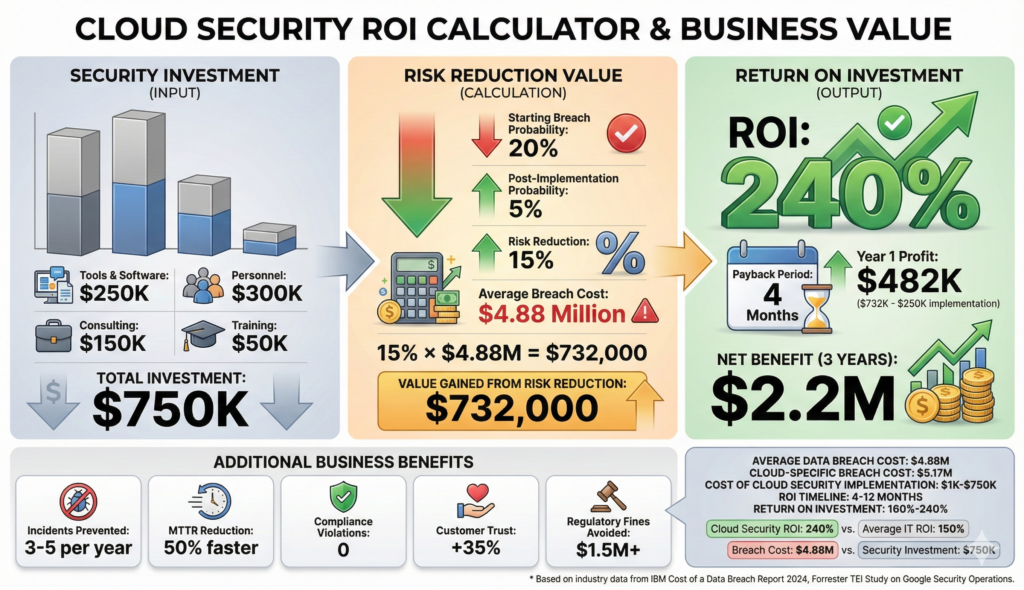
Quantify the value of your cloud security investments using these metrics:
Risk Reduction Metrics
- Incidents prevented or detected early: Track prevented breaches and early detections
- Dwell time reduction: Time from breach occurrence to detection (industry average: 276 days; target: <30 days)
- Mean Time to Respond (MTTR): Time from incident detection to containment (industry average: 45+ days; target: <8 hours)
- Vulnerability remediation time: Track time from discovery to patching
Compliance and Risk Management
- Compliance violations: Track GDPR, HIPAA, SOC 2, and other framework violations
- Audit findings: Monitor number and severity of audit findings
- Regulatory fines avoided: Quantify fines that would have resulted from non-compliance
- Failed compliance audits: Track audit pass/fail rates
Operational Efficiency
- Automated remediation rate: Percentage of security issues automatically fixed
- Security team productivity: Incidents handled per analyst per month
- Tool consolidation: Reduction in number of security point solutions
- False positive reduction: Reduction in alert noise and investigation burden
Financial Metrics
- Total cost of ownership (TCO): Sum of tool, personnel, and consulting costs
- Cost avoidance: Prevented breach costs minus security investment
- Return on Security Investment (ROSI): (Risk Reduction – Cost of Security Control) / Cost of Security Control
Example ROI Calculation:
- Annual security investment: $250,000
- Breach probability reduction: 15% (from 20% to 5%)
- Potential breach cost: $4.88 million (industry average)
- Risk reduction value: $4.88M × 15% = $732,000
- ROSI: ($732,000 – $250,000) / $250,000 = 1.93 (193% ROI)
- Payback period: ~4 months
COMMON IMPLEMENTATION PITFALLS TO AVOID
- Over-automating too quickly: Implement foundational controls manually first; automate later
- Ignoring the shared responsibility model: Remember that cloud providers handle infrastructure, not your data and access controls
- Treating security as IT’s responsibility alone: Security requires organization-wide commitment and cultural change
- Implementing without a plan: Reactive security is more expensive than proactive planning
- Neglecting training: Technical controls fail when users aren’t trained and aware
- Incomplete logging and monitoring: You can’t respond to threats you don’t detect
- Ignoring third-party risks: Your security is only as strong as your vendors
- Delaying incident response planning: Response capabilities matter more than prevention in real breaches
- Trying to do everything at once: Prioritize quick wins and phase implementation
- Not measuring results: Without metrics, you can’t justify investments or improve
CLOUD SECURITY IMPLEMENTATION CHECKLIST
Use this checklist to track progress through your cloud security implementation:
Foundation (Weeks 1-4)
- ☐ Complete cloud asset inventory across all environments
- ☐ Classify data by sensitivity level
- ☐ Identify compliance requirements (GDPR, HIPAA, SOC 2, etc.)
- ☐ Document security gaps and develop roadmap
- ☐ Establish governance structure and assign ownership
- ☐ Develop security policies and procedures
Core Controls (Weeks 5-12)
- ☐ Enable MFA for all human users and privileged accounts
- ☐ Implement least privilege access controls
- ☐ Enable centralized logging for all cloud resources
- ☐ Implement SIEM or security monitoring platform
- ☐ Encrypt sensitive data at rest and in transit
- ☐ Deploy cloud security posture management (CSPM) tools
- ☐ Establish automated configuration compliance checking
- ☐ Conduct initial security assessment and document baseline
Advanced Controls (Weeks 13-20)
- ☐ Implement network segmentation and zero-trust architecture
- ☐ Deploy container and workload security controls
- ☐ Establish vulnerability scanning and management program
- ☐ Develop and test incident response plan
- ☐ Implement backup and disaster recovery procedures
- ☐ Deploy advanced threat detection capabilities
- ☐ Conduct first penetration test
- ☐ Establish compliance reporting and audit procedures
Optimization (Weeks 21+)
- ☐ Automate security tasks and remediation
- ☐ Implement SOAR (Security Orchestration, Automation, Response)
- ☐ Establish 24/7 security operations capabilities
- ☐ Conduct regular security training and awareness programs
- ☐ Implement continuous improvement processes
- ☐ Achieve target compliance certifications (SOC 2, etc.)
- ☐ Establish security metrics dashboard and reporting
- ☐ Conduct annual comprehensive security assessment
RESOURCES FOR YOUR CLOUD SECURITY JOURNEY
Cloud Provider Security Resources
- AWS: AWS Well-Architected Framework Security Pillar, AWS Security Best Practices
- Microsoft Azure: Azure Security Benchmark, Azure Well-Architected Framework
- Google Cloud: Google Cloud Architecture Framework, Google Cloud Security Best Practices
Compliance Frameworks
- GDPR: https://gdpr-info.eu/
- HIPAA: https://www.hhs.gov/hipaa/
- SOC 2: https://www.aicpa.org/interestareas/informationtechnology/assurance/softrustservicessoc2
Tools and Solutions
- CSPM Tools: Wiz, Orca Security, Lacework, Palo Alto Networks Prisma Cloud
- Cloud Native Application Protection Platforms (CNAPP): CrowdStrike Falcon, Microsoft Defender for Cloud
- SIEM/Security Operations: Splunk, Microsoft Sentinel, Google Security Operations
- Vulnerability Management: Qualys, Tenable, AWS Inspector, Azure Vulnerability Assessment
- Identity Management: Azure AD/Entra ID, Okta, Jump Cloud
Learning Resources
- SANS Cloud Security Essentials
- Cloud Security Alliance Certifications
- Pluralsight Cloud Security Courses
- Linux Academy / A Cloud Guru Cloud Security Training
CONCLUSION
Cloud security is no longer optional—it’s essential for every organization, regardless of size or industry. The financial impact of breaches ($4.88 million average cost) far exceeds the investment required for proper security implementation.
The good news: Organizations that implement cloud security systematically see significant returns:
- 240% ROI through risk reduction and operational efficiency
- 70% reduction in breach risk
- 50% faster incident response times
- Strengthened customer trust and competitive advantage
Whether you’re an enterprise managing complex multi-cloud environments or a small business getting started with cloud security, the principles remain the same:
- Start with assessment to understand your current state and compliance requirements
- Implement foundation controls (IAM, encryption, logging, monitoring) before advanced capabilities
- Adopt zero-trust mindset: Never assume trust; verify everything
- Automate relentlessly to scale security without proportional staffing increases
- Measure results using clear metrics to demonstrate value and drive continuous improvement
- Invest in people through training and awareness; technology alone cannot secure systems
- Stay current by continuously learning about emerging threats and best practices
The cloud security landscape will continue to evolve as threats become more sophisticated. Organizations that commit to continuous improvement and adaptability will thrive, while those with static security approaches will fall behind.
Your cloud security implementation journey doesn’t end—it begins with a commitment to protecting what matters most: your data, applications, and business continuity.
About GID Studio
GID Studio specializes in helping enterprises and small businesses implement robust cloud security solutions that balance protection with operational efficiency. Our proven frameworks, consulting expertise, and hands-on implementation support help organizations achieve compliance, reduce risk, and maximize ROI from their cloud security investments.


Add your first comment to this post
You must be logged in to post a comment.